How I built video analytics for my stores knowing nothing about computer vision
One day I woke up and thought: why not build video analytics from my store cameras? Before, I couldn't even dream about it. Now you can take a ready-made model and build everything with a colleague (Claude). It ended up taking two months. And the hardest part wasn't the technology. It was that the model kept stopping at the first solution it found.
Act 1. Getting video for a test
To start experimenting, I had to get the video from the cameras onto a computer. My stores have Xiaomi home cameras. They record to an SD card, and the only way to download the recordings is the mobile app, there is no web access. One idea was to emulate Android and download everything one by one: a hack, but for a test it's cheaper than replacing the equipment in every store. Claude even suggested putting a mini computer in each store.
In the end I pushed myself and did the hardest part of the whole experiment: I walked to the nearest store (let's call it store 1), took out the card and brought it home. It had 29 GB on it - only four days of footage. For some reason I expected less.
Act 2. Running the model
I know nothing about computer vision. All I'd heard is that you can detect people and objects in video. I asked the AI to run some model, and it picked YOLO11 in size s (small). Nobody checked why s: it was simply convenient, the laptop was already running hot. Later I asked why not take a better model, and only then did we compare them and switch to m.
The laptop went into the stratosphere for the whole night. The result looked impressive: 2.7 people in the frame on average. The model didn't count conversion: it can't follow the same person from frame to frame and gets confused, so it just counted how many people were in the frame. The numbers suggested there were lots of people and the seller was bad at working with them. Fix the sales, and you never have to work again.
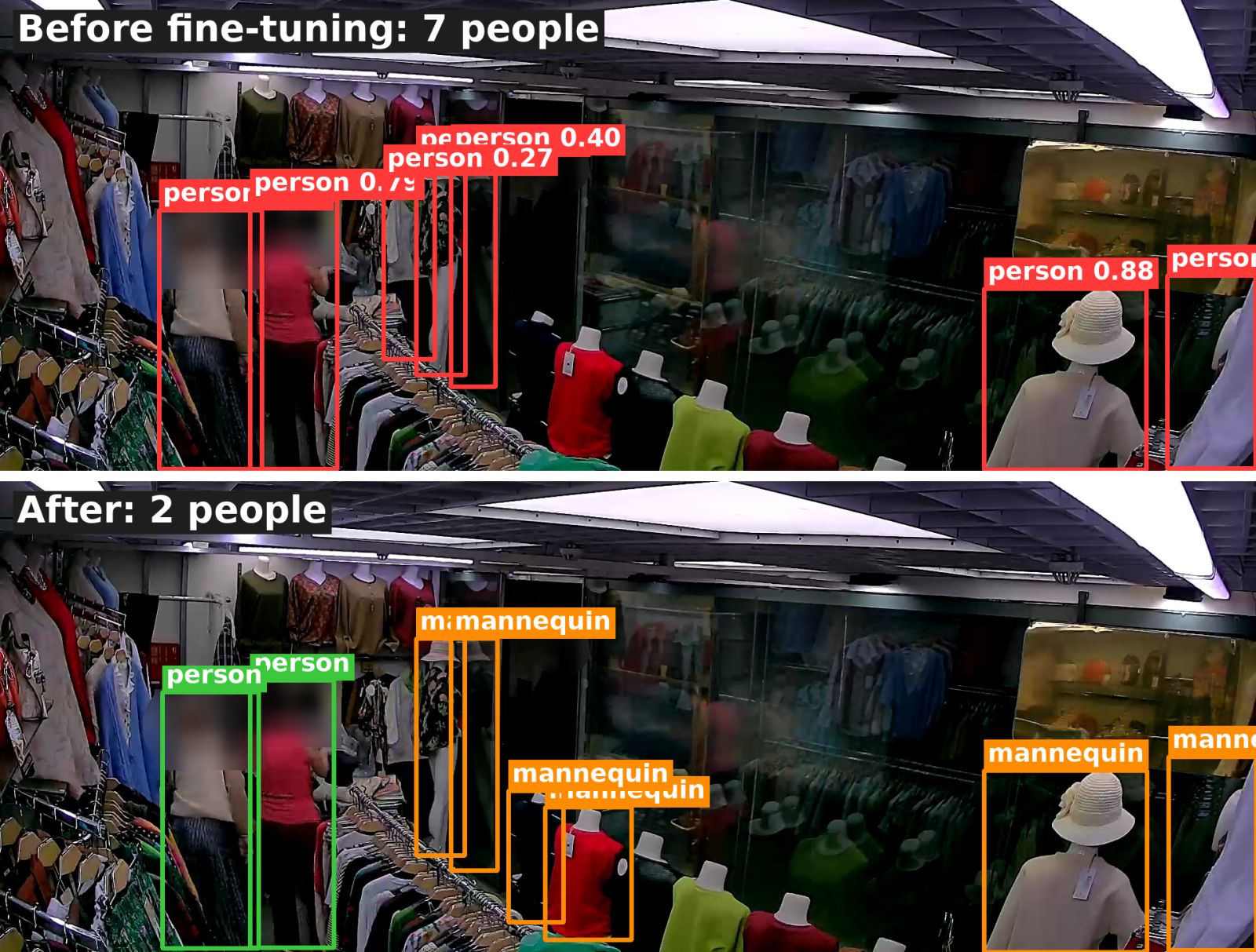
I asked for a couple of frames with the boxes drawn and saw that the model counted mannequins as people too. And it was more sure about a mannequin than about a real seller behind a rack. The mannequins are always in the store, hence the constant 2.7 people in the frame.
Act 3. Apathy and an attempt to get something useful
We discussed it with the AI and realized we couldn't count anything this way. So as not to leave empty-handed, I asked to find at least something useful. We could tell when the seller actually arrived and left: that part was clear, and we found some late arrivals and early departures. But the time on the chair at the till was questionable: the seller turns away, and the model no longer recognizes her. You can't trust that.
I got a bit sad, and then remembered that you can transcribe sound and use the conversations to understand how the seller sells. I asked to run all recordings through a speech recognition model (Whisper). But I didn't check that I'd been understood correctly, and the model only processed a few minutes around each sale. That way you never learn why a sale didn't happen. And what if someone worked with a customer for ten minutes?
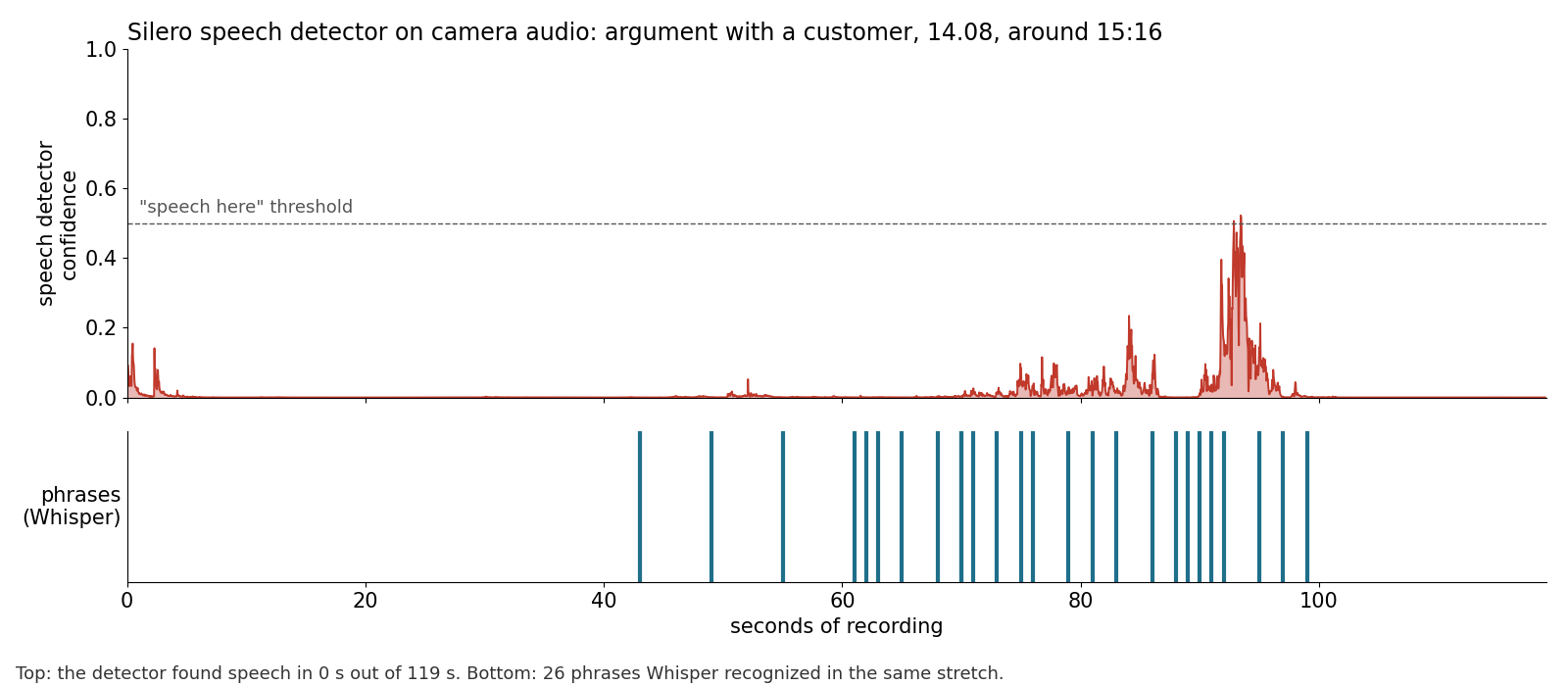
Then it got more interesting. To find speech across the whole day, Claude took a separate model - a speech detector. It said there was speech 1-4% of the time, and Claude confidently concluded: the audio is useless, we need a separate microphone at the till. I opened the recording and heard an argument with a customer exactly where the detector showed "silence". On camera audio it turned out to be deaf.
Act 4. Resisting imposed beliefs
Another day, I wake up and think: can't I fine-tune the model on my own labels? The answer: you can. It's just unclear why we didn't do that from the start.
We took random frames from each day, 254 in total. We quickly built a labeling interface, and I labeled everything in about twenty minutes: where a mannequin was counted as a person, I mark it as a mannequin, where a person was missed, I mark a person.
The first training run wasted nine hours because of one setting. The second time it worked. We checked on frames the model hadn't seen: before, it counted people correctly on 8% of frames, now on 76%. Extra "people" dropped from 81 to 7.
Act 5. Let's count conversion
Happy, I ask to count conversion, forgetting that people still need to be linked across frames. I get about 240 people a day and 2% conversion: bad sellers again. I ask for a photo of every "visitor" and see that the model counted the same people several times, and the seller as a new person every time.
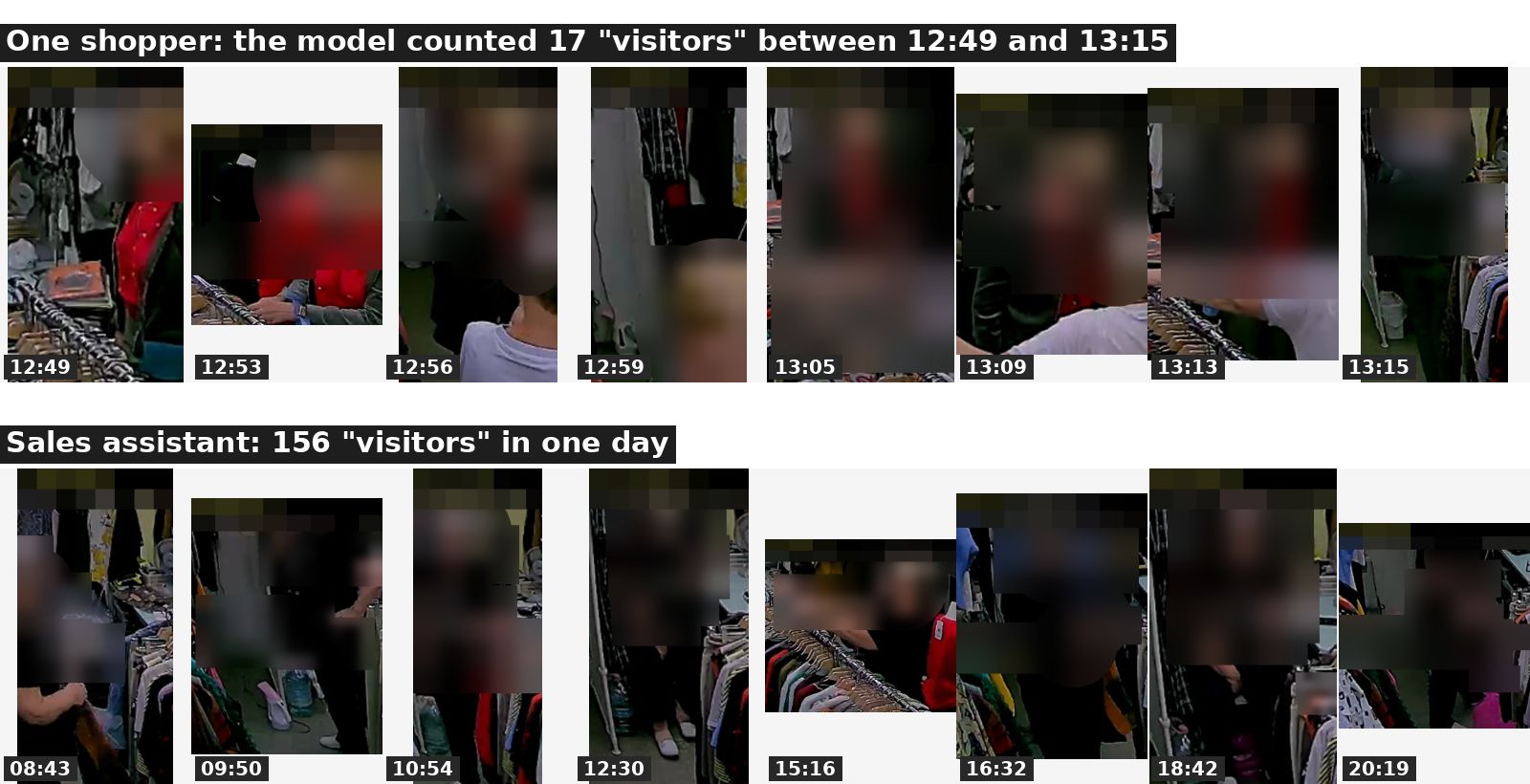
So I labeled the people and the seller myself: 1,580 frames in 40 minutes. It turned out 32-53 people come in per day, 43 on average. Over four days that's 172 people, 21 receipts, 12% conversion. The first traffic number was five times too high.
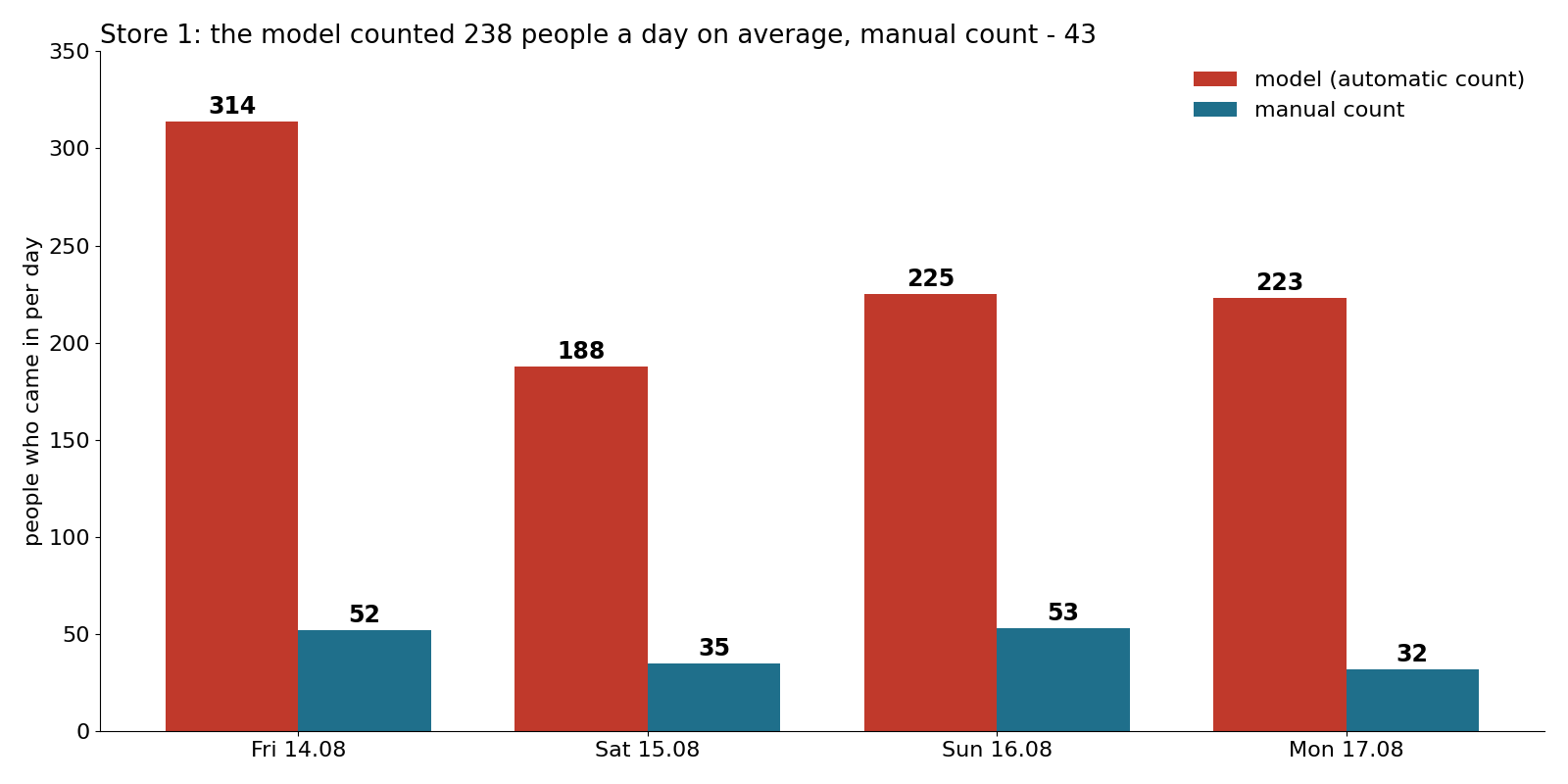
I also wanted to answer the question this all started with: why is revenue fine one day and a disaster the next? From Friday to Saturday revenue fell 6.5 times. Fewer people came in, 35 instead of 52, and on Saturday the store closed earlier. But there were also 2 receipts instead of 8. Two receipts tell you nothing about the seller, four days are not enough for that answer.
Act 6. Round two with voice
I was still curious how each seller sells. I asked to run speech recognition over the whole working day and match the text to the video, so that at any moment I could listen myself and tell who is the seller and who is the customer. Claude warned that in silence the model starts making up words. It does, but that's easy to filter out.
Over four days there were 119 conversations, and only 17 ended with a receipt. The relief seller spends all her time selling, drily, but she sells well. The main seller constantly chats about anything except the product. The longest conversation at the till before a purchase lasted eight minutes - about pickling cucumbers. And she offended one customer so much with her opinion about clothes that the customer left.
Four days is not much. But you can already see which habits are worth spreading to other sellers, and what deserves a remark.
Act 7. Downloading the recordings
I couldn't stop thinking that the recordings could reach a server without replacing any equipment. I wanted a system that runs continuously, not a one-time experiment.
In the Xiaomi app, video downloads one minute at a time, and each minute has to be selected by hand: an hour of footage means 60 taps. One minute took a minute and a half to download on the phone. Downloading a working day takes longer than the working day itself.
Again I ask to emulate Android on a server. This time we couldn't even log in: the Xiaomi login screen is protected and simply doesn't render on a server. The workaround: log in on an emulator on my laptop and move the ready session to the server. I looked at what servers with a GPU cost - from 15,000 rubles (about $170) a month. Not fun, so I shelved the project.
Act 8. Industrial scale
Meanwhile I sat down to write this post twice, and both times the experiment felt incomplete. A month later I decided to set everything up on a server. I found a service where you can rent a GPU server by the minute (it has helped me many times since in other tasks, I recommend it).
Downloading failed again: Claude wrote that it wasn't working yet. I replied: "No, figure out how to do it, I'm sure there's a way." There was: the app only downloads recordings over Wi-Fi, and the emulator reports a wired connection. We changed three lines, and a minute of footage started downloading in 11 seconds instead of a minute and a half. We downloaded 11 days from two other stores, 2 and 3, 67 GB - almost filled the server, 9 GB left free. By the way, downloading doesn't need a GPU at all, only the model does.
Different stores, different camera angles, the model has to be trained again. This time I didn't label myself and asked Claude. By its labels, accuracy went from 41% to 84%. Then I went through 300 frames myself anyway, and 69 needed fixes. Claude almost never drew extra people, only 5, but it missed 61 out of 342, roughly one in six. It turned out it wasn't labeling from scratch, it was sorting into classes whatever the standard model had found. Whoever the model didn't see, Claude didn't see either. So the 84% was measured against incomplete answers, and only a new training run will show the real accuracy.
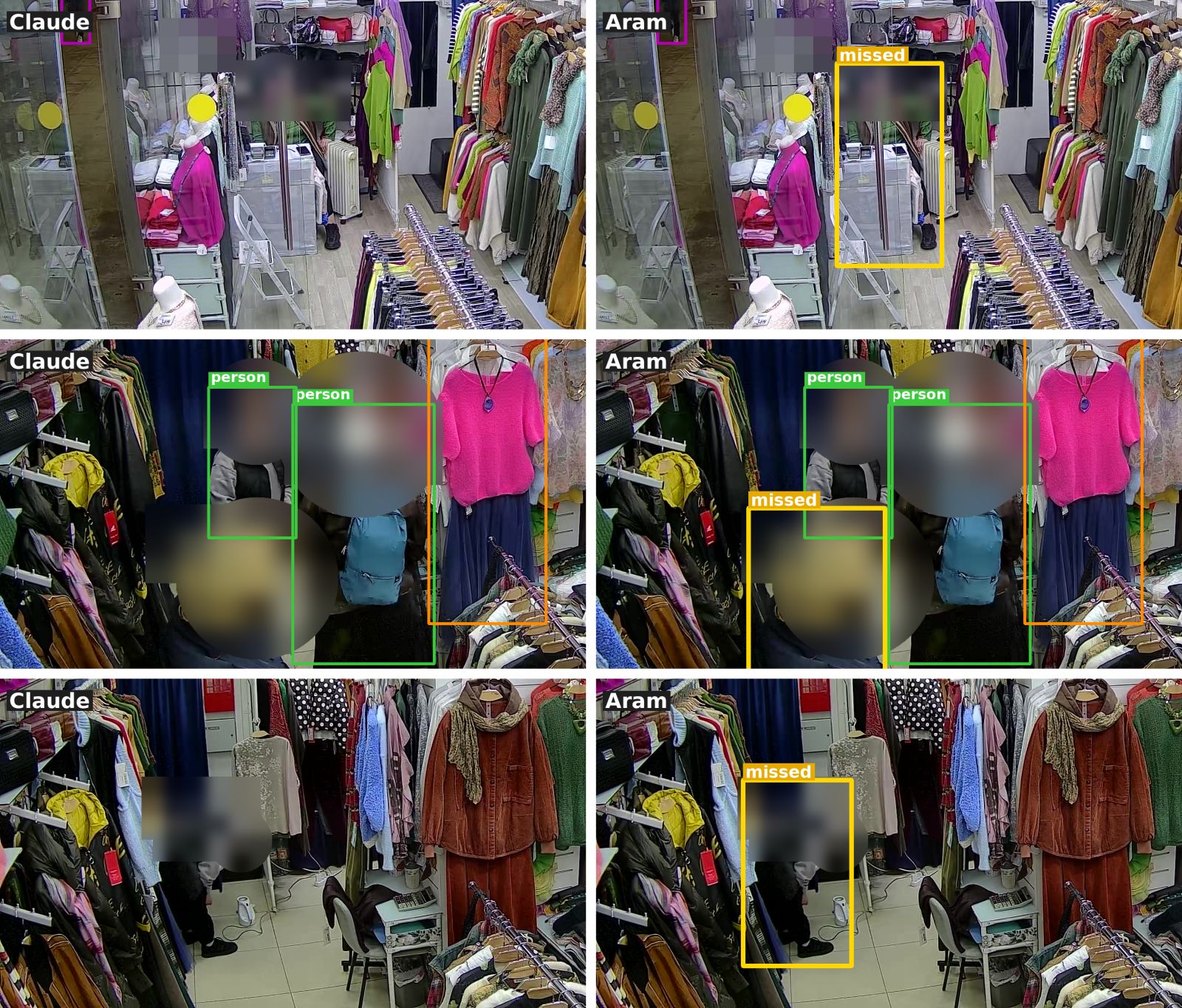
And then the model rushed to a conclusion again. Claude counted 130-150 visits a day and 6-9% conversion: "plenty of people, poor selling". I asked a second Claude to recount a reference hour by hand, and it found 7 people instead of 17-20: the first one had counted passers-by outside the window as customers. We checked against a manual count over 12 hours. Result: 47-61 people a day come into store 2, and every 5th to 7th buys. 59-87 people come into store 3, with conversion from 5% to 24% on different days. These are preliminary numbers for now: the model learned from labels that were missing one person in six.
Act 9. A pause, not the end
The other stores need new SD cards, so I've put the industrial scale on hold. The model needs more training, at least to 95%. Storing video isn't necessary: process it, delete it, keep only the numbers.
On money: if once a week you take one day from all cameras in six stores and process it on a GPU rented by the hour, it comes to about 2,500 rubles (about $30) a month. Every day is already 15-25 thousand rubles ($170-280), and then you hit the store's mobile modem: seven cameras are about 35 GB a day through one modem. So I'll most likely start with this weekly pulse.
What it all adds up to
First, when else would I have gotten into computer vision? It's absurd, and yet - I did.
Second, be ready for the model to hold you back. It picks the simplest solution and says "it won't work" until you say "I'm sure there's a way". And when something does work, it just as confidently gives you the first number and jumps to a conclusion. Twice I almost decided my sellers were bad at selling, and both times a manual count showed the truth. And when Claude did the labeling itself, it missed one person in six. Don't trust "it won't work" or the first number: check it yourself on a small piece.